About 4 months ago we took on a new developer and I started by explaining that it takes about 3 months to become confident with Plone. Being a confident developer he took this as a challenge, assuming that he would be over the learning curve within 3 weeks.
After 4 months plus of working with us I asked him to give me his feelings about my 3 month timeline. This was his response (with a few additions from me):
"I think I'm comfortable with it. However, it [depends on] the type of task you've given me... I might be uncomfortable with [doing a migration]. It's like giving a recently graduated doctor the task of performing a heart surgery as his first task at the hospital..."
So he's comfortable with some tasks but there are others that will require more experience.
I've actively been experimenting with ways of making Plone easier for at least 3 years (and less actively for longer than that). In that period I've come up with the idea of Plone Drills, created a Diazo Snippets Library and Chrome Plugin, worked out fast cloud based installation of Plone, done work on a Plone Newbie Developer Toolkit (Plone 4 only), contributed to Alex Clark's Plock Plone Installer project and spent a lot of time on a theming approach for Plone which "extends" Diazo called Gloss. I also created a short video series related to using Gloss with Webflow.
I'm still haunted by this problem space and the general idea of on-boarding web developers. It's led me to my latest side project, the aim being to provide a faster on-boarding experience for new Plone developers. I've been calling it a book but that might be a poor description since it will most likely involve more than just a text.
BTW... If you are interested in the fastest way to get going with Plone then I'd encourage you to sign up for my upcoming book/project/thing. You should see the option to sign up somewhere on this page.
Showing posts with label learning. Show all posts
Showing posts with label learning. Show all posts
Thursday, January 21, 2016


Monday, May 18, 2015
Baby steps in learning ReactJS
As a way to better understand my process of learning a new technology I've captured the first two days of my journey of learning ReactJS

Notes
At this point my aim is to get a general grasp of what ReactJS is, I'm focusing on understanding the mechanics of the framework. I think my next step will be to follow along more closely with the "Thinking in ReactJS" presentation.
Impressions:
ReactJS flies in the face of convention and eschews the idea of templates, favouring what they call views, also very counter-intuitively they "redraw" the DOM for every update yet in benchmarks are able to outperform AngularJS. To achieve this they use a virtual DOM and only render to the real DOM on an "as needed" basis.
Notes
In following the tutorial the first example failed because the code was out of date. This slowed me down for about 5 minutes. It turns out that React.renderComponent() is now replaced with React.render() so I was working with a slightly dated tutorial, after replacing switching the code to use React.render() instead of React.renderComponent() I was able to make my way through the tutorial.
After an hour of following the tutorial I had the static version working and started to learn about React's concept of "state". I decided to break for a while and grab a snack.
Next I'll spending time getting comfortable with idea of working with state.

Day 1 - Thursday April 30, 2015
What I did on this day- Downloaded the starter kit from the website and tried it out
- Started the tutorial and bailed out
- Watched the 2013 presentation on ReactJS
- Watched most of Thinking in ReactJS video from tagtree
Notes
At this point my aim is to get a general grasp of what ReactJS is, I'm focusing on understanding the mechanics of the framework. I think my next step will be to follow along more closely with the "Thinking in ReactJS" presentation.
Impressions:
ReactJS flies in the face of convention and eschews the idea of templates, favouring what they call views, also very counter-intuitively they "redraw" the DOM for every update yet in benchmarks are able to outperform AngularJS. To achieve this they use a virtual DOM and only render to the real DOM on an "as needed" basis.
Day 2 - Friday May 1, 2015
What I did on this day- Back on the ReactJS website and then decide to work my way through the Thinking in react tutorial again.
Notes
In following the tutorial the first example failed because the code was out of date. This slowed me down for about 5 minutes. It turns out that React.renderComponent() is now replaced with React.render() so I was working with a slightly dated tutorial, after replacing switching the code to use React.render() instead of React.renderComponent() I was able to make my way through the tutorial.
After an hour of following the tutorial I had the static version working and started to learn about React's concept of "state". I decided to break for a while and grab a snack.
What I know now
- ReactJS is about building components, usually from existing HTML and Javascript
- They provide a HTML like syntax called JSX which simplifies the creation of these components
- I'm learning some of ReactJS's methods such as render()
Parting thoughts
So far I've spent 3 to 5 hours on this journey and things are starting to make sense. My feeling at the moment is that I first needed to capture the overall concept of what React does, the virtual DOM and React's JSX syntax. Once I was fine with that I needed to use it in a trivial example, in my case the static version from Thinking in React tutorial. I'm confident about being able to do that now.Next I'll spending time getting comfortable with idea of working with state.
Saturday, June 1, 2013
Notes from installing Debian on a CubieBoard
The CubieBoard is a cheap, ARM based computer that ships with Android 4 (ICS) installed, these are notes related to my first steps hacking around with the board and installing a Debian server image.

The image needed to be "installed" on an microSD card. To achieve this on a Mac running OS X I had to run the following commands to become the root user then unmount the SD card and dump the debian server image to the SD card.
The last step easily took 40 minutes.
It booted with little visible indication of success.
.png)
After this I logged in using the ip address that I discovered, the default username and password are "root" and "password".
Then recreated and installed the new script.bin and rebooted
After reboot it still would not work, it turned out that I still needed to install a special module so that the OS would "see" the LEDs, the following command worked for me:
To ensure that the module was loaded on future boots I added the module to /etc/modules file:
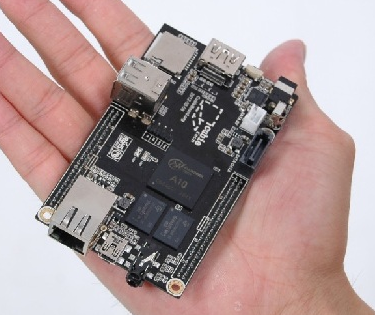
Image from the Cubieboard.org website
Materials
- A 2GB micro SD card (I had problems with a 1GB card)
- A development machine with OS X or Linux (there's a way to do this on Windows, but I didn't have any Windows machines at close hand)
- Ethernet cable for connecting the CubieBoard to a network with DHCP support
Getting the Debian Image
My first task was to source the new image that would run the CubieBoard, I downloaded the image from http://romanrm.ru/en/a10/debianThe image needed to be "installed" on an microSD card. To achieve this on a Mac running OS X I had to run the following commands to become the root user then unmount the SD card and dump the debian server image to the SD card.
sudo su
diskutil list #for me the sd card was located at /dev/disk1
diskutil unmountDisk /dev/disk1
bzip2 -dc a10-debian-server-2gb.2013-04-11.img.bz2 > /dev/disk1
The last step easily took 40 minutes.
Booting the CubieBoard
I then inserted the microSD in the microSD slot of the CubieBoard and powered it up.It booted with little visible indication of success.
Logging into the Board
To be sure it was working I needed to find a way to log into the machine. I was able to find the ip address of my CubieBoard by accessing the administrative page of my router and viewing the list of DHCP clients. The output looked like this, the device identifies itself as being debian:.png)
After this I logged in using the ip address that I discovered, the default username and password are "root" and "password".
ssh root@192.168.x.x # x.x would be the rest of your ip addressAnd ran an update
apt-get update
Playing with the LEDS
My first project entailed getting control over the CubieBoard's built in LEDs. I had to rebuild my script.bin which required installing supporting tools (fex2bin and bin2fex). bin2fex converts the script.bin to a text editable script.fex file and fex2bin regenerates the binary file that the CubieBoard looks for at boot time. I had to retrieve the latest version of the tools from github using the commands below:apt-get install git-core pkg-config libusb-1.0-0-dev build-essential
git clone https://github.com/linux-sunxi/sunxi-tools.git
cd sunxi-toolsThen I created a fex file from my script.bin
make
./bin2fex /boot/script.bin > /boot/script.fexEdited the /boot/script.fex file to include the following:
[leds_para]leds_used = 1leds_num = 2leds_pin_1 = port:PH20<1><default><default><0>leds_name_1 = "green:ph20:led1"leds_pin_2 = port:PH21<1><default><default><0> leds_name_2 = "blue:ph21:led2"Then recreated and installed the new script.bin and rebooted
./fex2bin /boot/script.fex > /boot/script.bin
reboot
After reboot it still would not work, it turned out that I still needed to install a special module so that the OS would "see" the LEDs, the following command worked for me:
modprobe leds_sunxi
To ensure that the module was loaded on future boots I added the module to /etc/modules file:
echo "leds_sunxi" >> /etc/modulesI hope to do a lot more with this system as I become more familiar with it, I got a lot of help by Googling for the information, for more about working with the LEDS see http://linux-sunxi.org/Cubieboard/Programming/StatusLEDs
Thursday, January 3, 2013
Procedural Fluency, Slow Tech and programming
TLDR; I have a hunch that the crisis of attention that we are facing may affect the number of us that reach procedural fluency in our various vocations.
This video introduces the idea of slow tech, it is only peripheral to my discussion but gives valuable context.
I occasionally find myself exploring education theory (I can sometimes sound like I know what I'm speaking about), recently I've had an interest in Mathematics education (I teach my children Maths). It is fascinating to see first hand how they learn and what works for them. If you've done anything more than cursory reading about the teaching of Mathematics, you may have come across the idea of procedural fluency.
Procedural fluency can be thought of as the extent to which a person can efficiently complete a task in a predictable and repeatable way. In the absence of procedural fluency the learner can become distracted by the process and may lose site of the goal (or problem). Fluency is attained by becoming proficient with the vocabulary and methodologies of the given discipline.
So it seems to me that this idea can overflow into the realm of programming. What are the key procedures that a programmer needs to become competent in before they can become fluent problem solvers?
Questions
I have some questions:Does the lack of procedural fluency combined with modern distractions reduce the ability to learn skills like programming?
What if the number of technologies that surround us every day actually are working against our ability to develop procedural fluency? Is diminished procedural fluency a a bad thing?
Could we improve our procedural fluency by reducing the things that steal our attention?
Recommended Reading
Check out this discussion on the "shallows".
http://www.theshallowsbook.com/nicholascarr/Nicholas_Carrs_The_Shallows.htmlThursday, March 1, 2012
Tighten the Feedback Loop, Learn more
The extent to which an idea can be explored and developed is directly related to how easily it is possible to repeat and observe the results of tinkering.
- or -
The more feedback, the more you learn.
The more real time feedback available to a user is the more they will be able to experiment with how their changes affect the system. This type of exploration can yield some surprisingly valuable insights and the user will be able to more quickly integrate their new knowledge into solving problems. That's my summary of the presentation by Bret Victor on "Inventing by Principle". Just skip the first 5 minutes if you want to get the cool stuff, but the whole presentation is worth watching.
The presentation reminded me of something that Malcolm Gladwell pointed out in his book "Outliers". He noted that, Bill Gates was one of the few individuals who during high school was able to get access to a teletype computer. This is significant in following ways. 1) He was able to invest huge numbers of hours learning 2) This model of computer had a tighter feedback loop than other machines used at the time, he could see the results of his work more quickly and thus learn how his changes affected things, then do it again. If he had been born a decade earlier the best opportunity might have been working with punch cards (hint: you can forget about making discoveries quickly using punch cards). For Gates a wonderful intersection of circumstances gave him an advantage that put him head and shoulders above his peers (or seniors for that matter) at the time. Not to take away from the fact that he was a bright and driven man, but minus the opportunity to iterate over problems he may not have had the impact that he has on our times.
Thursday, September 15, 2011
3 must read books for newbie web designers
 http://www.20thingsilearned.
This is both a technology demostration and valuable education resource. The book makes excellent use of the new HTML5 technologies why teaching valuable lessons about the web, the internet and web browsers.

A series of tutorials that will walk you from beginner to advanced in the essential web technologies of HTML and CSS.

http://eloquentjavascript.net
I'll be honest and say that this is one that I haven't read yet, but it's on my reading list because the outline is really good. I think it will make teaching javascript a bit easier for me.
Once you've covered the basic technologies then you want to learn the processes associated with web management so head to:
http://webstyleguide.com/
After that you'll want to learn a bit about content management systems and web languages. I have a preference for Plone and Python.
Background on these web books
Some one recently asked me about learning Web Development. In answering them I came up with what I consider an very good web learning roadmap.
Tuesday, October 23, 2007
How to learn any new programming language (checklist)
 del.icio.us
  Digg
Digg  slashdot
  StumbleUpon
 So you want to learn Javascript, C#, Mono, Perl, Python, Boo, PHP, Whatever (well, I don't know if Whatever is a language), here is what you need to know.
Background
I Googled, and didn't find anything that had a step by step, structured way to learn a new programming language. So this is my attempt to capture the process as best as possible. It is especially clear in my head at the moment, because I'm in the process of adding Ruby to my arsenal. From a distance, Python still looks cleaner, but my curiousity about rails has got the better of me.
Level 1 - Get the Basics
Don't be too picky about the exact names of the subtopics presented below, different books and tutorials may give these different names. Generally, I've found that these are the basics to get up and running.
- Basic Syntax - All languages have a structure, a way that commands are written. Learn it, is indentation important? Do they have special symbols e.g. ';' or '_'. Keep paying attention to this throughout your learning (learn how to use comments).
- Learn Data Types - The typical data types include: Strings and Integers, other types vary in name and function from language to language, learn what a type is.
- Learn Variables - It is important to understand what variables are, how they are used and represented, are they dynamically typed? are they loosely typed? There's a difference.
- Learn Operators - This is the "mathy" stuff -,+,* etc..
- Learn Flow Control - Look for information on loops, if-then and others.
- Learn Basic Data Structures - Find out what are the basic data structures of the language, these could be lists, arrays, dictionaries, hashes. The names and features will vary by language.
Level 2
- Learn Objects and Classes -
- Learn Exception/Error Handling -
- Learn Data Structures and Algorithms -
- Learn Design Patterns - Many problems in software development fit into a particular 'pattern', Design patterns help to make your code more reusable between projects.
Subscribe to:
Posts (Atom)